
Legal marketing review
Catch the
riskbefore
you publish.
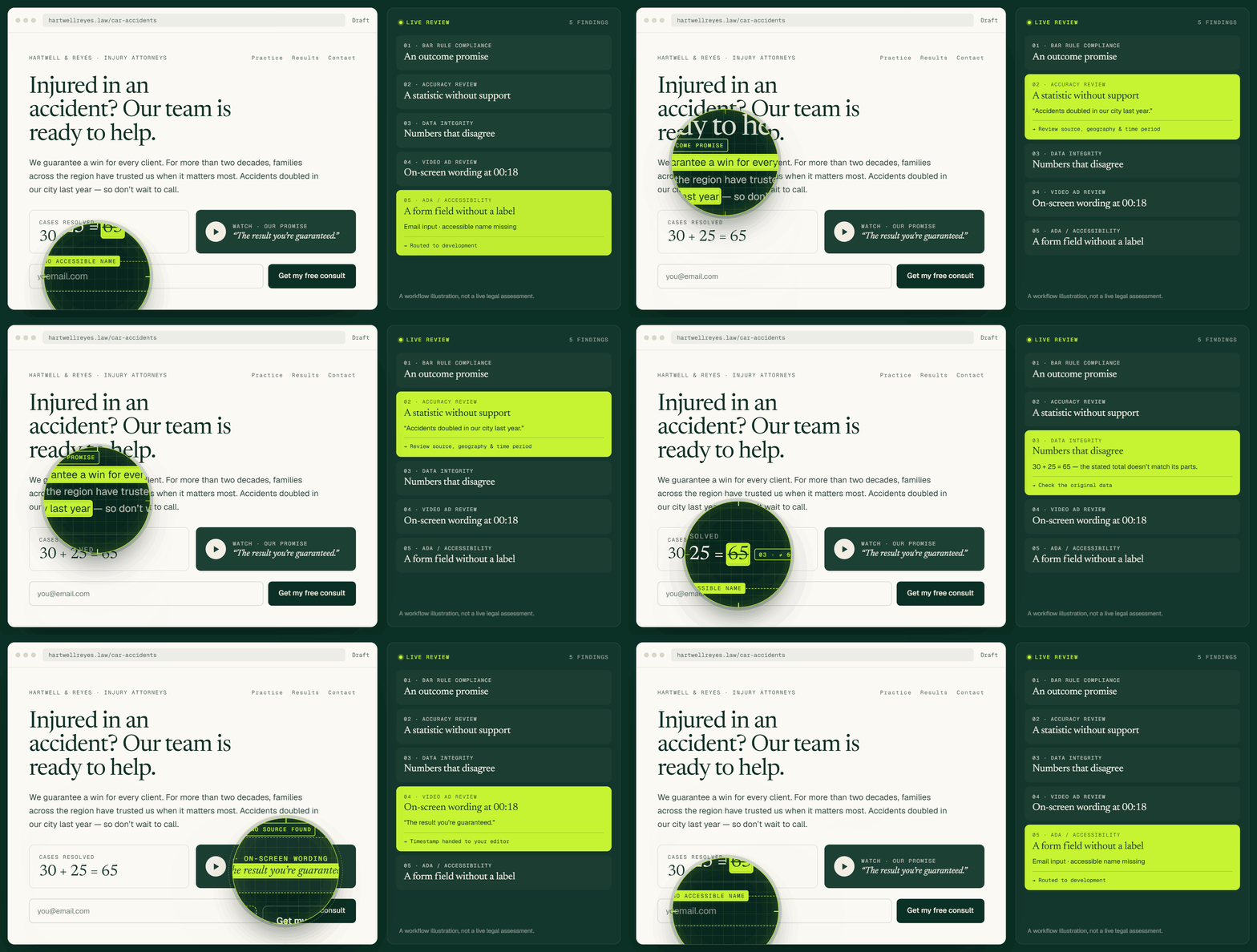
Five focused scanners read your firm’s marketing the way a reviewer would — bar rules, unsupported claims, accessibility — and hand back findings you can act on.
No account needed. One free Bar Rule Compliance scan per domain.
The scanners
More content.
More to check.
Each scanner reads for one kind of problem, so a finding always tells you what it is and where it came from. Run one, or run all five on a schedule.
Bar Rule Compliance
Screens marketing copy against the advertising rules of the jurisdiction you select, and shows the rule text behind every finding.
Found in the page’s opening paragraph:
We guarantee a win for every client.
An unqualified promise about the result of a matter.
Outcome guarantees are restricted in most jurisdictions.
Rewrite as a description of process, not result.
Accuracy Review
Finds the numbers, awards and superlatives on your site that a reader would expect a source for — and tells you which ones do not have one.
Found on the firm overview page:
Never lost a case in twenty years.
A verifiable claim with no citation on the page.
Comparative claims generally need substantiation.
Attach a source, or soften to what you can show.
Accessibility
Checks pages against WCAG 2.2 AA and reports the issues in plain language, with the element and the fix side by side.
Found in the page’s call-to-action band:
Contrast ratio 3.1:1 on the primary button.
Text contrast below the 4.5:1 minimum.
Low contrast text is unreadable for many visitors.
Darken the fill, or lighten the label.
Brand Consistency
Compares every page against the firm name, attorney titles, disclaimers and contact details you have told us are correct.
Found on three attorney bio pages:
Two spellings of the firm name in use.
The registered name and the display name differ.
Some jurisdictions require the name of record.
Pick one form and apply it everywhere.
Ongoing Monitoring
Re-runs the scanners you choose on a schedule and reports only what changed, so a fixed page stops appearing in your queue.
Found on a page edited yesterday:
A new testimonial without a disclaimer.
Content added since the previous scan.
Testimonials often carry a disclaimer requirement.
Add the disclaimer your jurisdiction expects.
BarCheck screens content and shows you the rule it matched. It does not give legal advice, and it does not replace your responsible reviewer.
How it works
Point it at a page.
Read the findings.
Publish with fewer surprises.
Connect
Add a site
Paste a URL or connect WordPress. Pick the jurisdiction whose rules should apply, and choose which scanners to run.
Review
Read the report
Every finding names the passage, the rule or standard behind it, and a suggested next step. Assign it, resolve it, or dismiss it with a reason.
Keep watch
Scan on a schedule
Set the cadence once. BarCheck re-reads the site and tells you what changed, so the queue stays about new work rather than old.
Why BarCheck
A finding you can
actually act on.
Most tools hand you a score. BarCheck hands you the sentence, the rule it matched, and what to do about it — which is the part a reviewer actually needs.
We guarantee a win for every client.
Model Rule 7.1 — communications about a lawyer’s services.
Rewrite as a description of how the firm works, not what it will win.
No guessing at the rule
The rule text sits next to the finding, so the reviewer is not hunting for it.
A queue that shrinks
Resolved findings stay resolved. Re-scans report what changed, not everything.
Something to hand over
Export a report for the partner, the marketing agency, or your own file.
Built for review, not scoring
A number tells you something is wrong. A finding tells you which sentence, and why it was flagged.
Jurisdiction you choose
Rules differ by state. Pick the one that governs the firm and the screening follows it.
Your reviewer stays in charge
Nothing publishes or changes on its own. BarCheck screens; a person decides.
Apps & integrations
Wherever the content already lives.
Scan before you hit publish
Findings appear in the editor sidebar while the page is still a draft, so the check happens before the mistake is live.
Get the pluginCheck any page you are looking at
Run a scan on the page in front of you — your own site, a competitor, or a draft on a staging domain.
Add to browserPut a scan in your own pipeline
Call the scanners from a build step or a CMS hook and get findings back as structured data.
Read the docsPricing
Five scanners.
Every paid plan.
Plans differ by how many sites you watch and how often they are re-scanned — not by which checks you are allowed to run.
Solo
1 siteFor a single firm site with one person doing the reviewing.
$49 per month
- All five scanners
- Monthly re-scan
- Up to 100 pages
- PDF export
- Email support
Firm
5 sitesFor a marketing team publishing regularly across several domains.
$149 per month
- Everything in Solo
- Weekly re-scan
- Up to 1,000 pages
- WordPress plugin
- Assign & resolve findings
Practice
UnlimitedFor agencies and multi-office firms with a formal review process.
$399 per month
- Everything in Firm
- Scan on publish
- Unlimited pages
- API access
- Priority support
Every plan starts with a 14-day trial. No card needed to run your first scan, and you can cancel from the dashboard at any time.
Compare plans
Line by line
| Feature | Solo | Firm | Practice |
|---|---|---|---|
| Sites | 1 | 5 | Unlimited |
| Pages per scan | 100 | 1,000 | Unlimited |
| Re-scan cadence | Monthly | Weekly | On publish |
| All five scanners | Yes | Yes | Yes |
| WordPress plugin | — | Yes | Yes |
| API access | — | — | Yes |
| Seats | 1 | 5 | Unlimited |
Questions
Before you
sign up.
The things firms ask us first. If yours is not here, the contact form reaches a person.
Is this legal advice?
No. BarCheck screens marketing content against published rules and standards and shows you what it matched. It does not give legal advice and does not create an attorney–client relationship. Your responsible reviewer decides what to do with a finding.
Which jurisdictions do you cover?
You pick the jurisdiction when you add a site, and the Bar Rule Compliance scanner screens against that jurisdiction’s advertising rules. If a firm markets in more than one state, you can run the same site against each.
How accurate is it?
Findings are screening signals, not verdicts. Some will be false positives, and some real problems will not be caught. Every finding shows the passage and the rule behind it so you can judge it yourself rather than taking our word for it.
Do you store our content?
We store the pages we scan and the findings we produce, so re-scans can report what changed. You can delete a site and its history from the dashboard, which removes the stored content.
Can our agency use one account for several firms?
Yes. The Practice plan covers unlimited sites and lets you set a different jurisdiction per site, which is the usual arrangement for agencies working across several firms.
What happens after the trial?
The trial runs 14 days with the full feature set. If you do not add a card, the account moves to read-only — your reports stay available, but new scans stop until you pick a plan.
Start here
Give one page a second look.
Run a free Bar Rule Compliance scan on any page of your firm’s site and read the findings for yourself.
BarCheck provides automated screening, not legal advice. Verify any cited material with your responsible legal reviewer before acting on it.